
Guide
Free Martial Arts Attendance Sheet and Fee Spreadsheet
Nikolay Kazmin · Updated October 07, 2026
Here is a free martial arts attendance sheet with monthly fees, built for a club with a few groups and fees paid in cash or by transfer. It’s one .xlsx file that opens in Excel, LibreOffice and Google Sheets, and you can download it straight away, with no email, signup or Google account. Attendance and fees sit on separate tabs, because who trained and who paid are different questions.
Download the spreadsheet (.xlsx, free)
What’s in the club membership spreadsheet
The file has four tabs, and each student’s name is typed only once:
- Instructions: seven short steps.
- Students: Name, Group, Parent or contact, Phone, Monthly fee, Start date and Notes.
- Attendance: one tab per month, with training dates across row 1 and an x for each student who trained.
- Fees: twelve months from the start of your season, one cell per student per month.
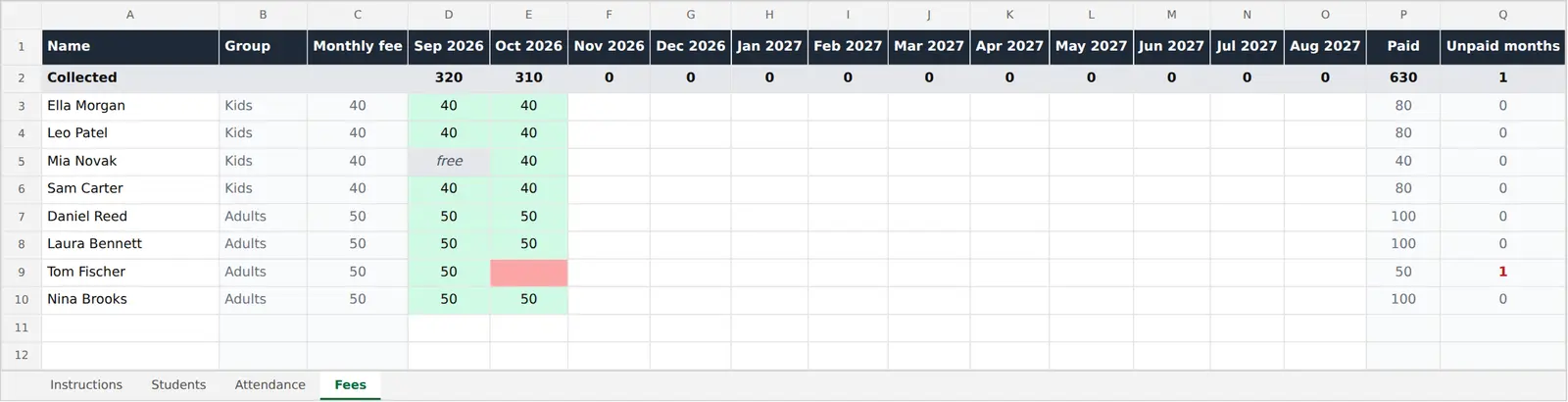
It comes with eight made-up students in two groups, Kids at €40 a month and Adults at €50. One child was injured in September and agreed not to pay that month, and one adult hasn’t paid October.
Keep the Students tab to those seven columns. Birth dates and medical notes would only add data about minors to a shared file, and the GDPR asks for data limited to what is necessary.
How do I use a martial arts attendance sheet in class?
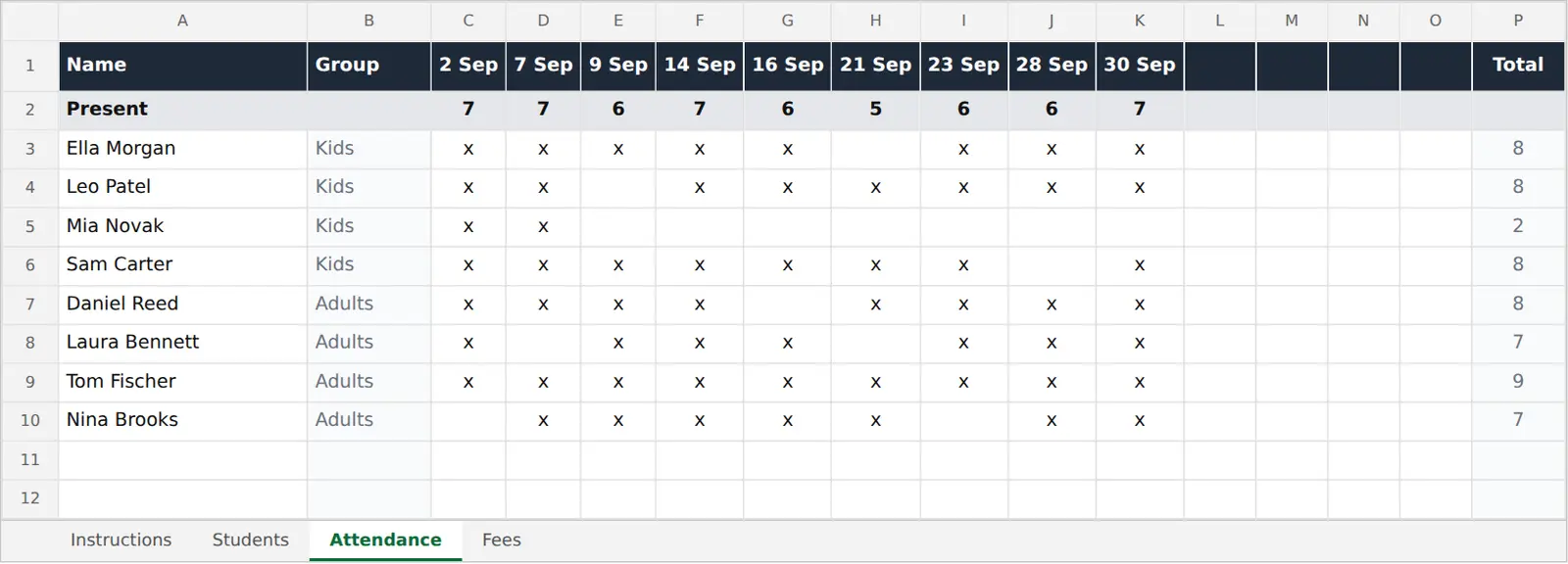
Mark the sheet once per training, at a fixed moment such as right after the bow-in, with an x in that day’s column for every student on the mat. Type the month’s training dates into row 1 beforehand. It counts who was present at each training in row 2 and each student’s trainings in the Total column.
New students go on Students first; on Attendance, pick the name from the dropdown and the group fills in. Late arrivals get their x when they step on, not from memory at home. For a new month, duplicate the tab, clear the marks and type the new dates. Before a grading, the Total column shows how often each student trained. More on the routine in how to track attendance in a martial arts club.
Recording fees: amount, free or empty
Fees use the same names on their own tab, so a missed training never looks like a missed payment. Put the month your season starts in D1 and the next eleven follow. Each cell takes one of three things:
- The amount, when the student pays in cash or by transfer. It turns green and row 2 adds it to that month’s total.
- free, for an agreed month off, such as an injury. It turns grey.
- Nothing, while they haven’t paid. Once the month has started it turns red, and Unpaid months counts the red cells per student.
Type cash in the same evening, not at the end of the month. With Fees open before class, the red cells show whom to ask while they’re on the mat. The sheet doesn’t send reminders or take payments, and it isn’t an accounting document; it records who paid for which month.
Sharing one copy between instructors
With two senseis, the usual problem is two versions of the file, with cash recorded in one but not the other. Upload it to Google Drive or OneDrive and share that single copy with the instructors only. Google Sheets can edit an .xlsx directly and keep it in Office format, and whoever takes the money types it in.
For many small clubs that’s enough for years. It gets tiring for practical reasons, not a student count: typing into small cells on a phone mid-class, a new tab every month, a list that drifts out of date. That’s where an app like Dojoto helps. You tap the faces of who came, each week’s trainings appear by themselves, and a cash payment is recorded with the amount and the sensei who took it. It can import the student list from this sheet. If you need card payments, direct debit or parent logins instead, a full management system is the better fit.
Want it for your dojo?
Join the waiting list. Your first 3 months are free.