
Guide
How to Track Attendance in a Martial Arts Club
Nikolay Kazmin · Founder · 2nd dan in karate and ju-jitsu · Updated October 17, 2026
To track attendance in a martial arts club, you need one master list of your students and a register that is ready before they arrive, so you can mark each one as they come through the door. Each tool has its own hassle. Paper needs a fresh sheet printed and dated every month, can’t be shared, and has to be typed into a computer before anyone can count it. A spreadsheet is easy to share but needs the same monthly preparation, and its interface was made for a desktop screen, not a phone at the door. An app removes the preparation and the typing-in, at the cost of a subscription and an internet connection.
Create one master list for your students
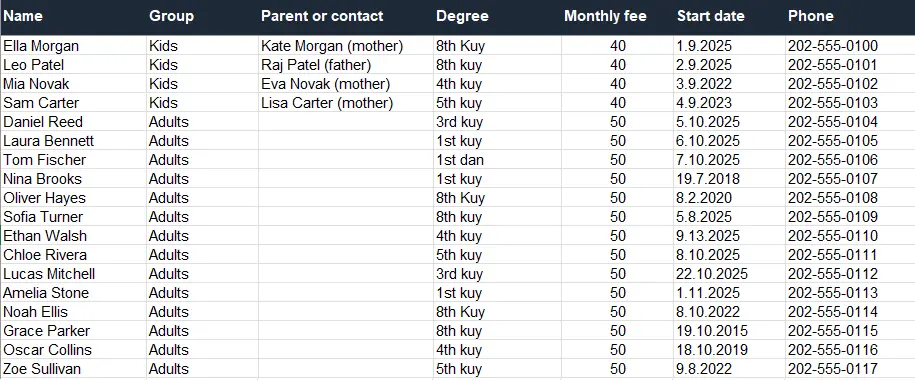
Most register problems start with names. The same child is “Maria Petrova” on the Monday sheet and “Mimi” in a sensei’s phone, and at the end of the month nobody can say how often she trained. Create one master list and keep everything about each student there: full name, group, start date, current belt, phone and email. Every attendance register copies names from this list. A separate sheet per group is fine, as long as each student appears in only one of them.
Keep the list in the cloud, on Google Drive or OneDrive, so a dead laptop doesn’t take it with it, and share it with the other senseis. Clean it once when you set it up: merge duplicates and settle on one spelling per name. The GDPR asks that personal data be accurate and kept up to date, so fix a wrong number when you notice it and move students who have left off the active list.
What should a martial arts attendance sheet record?

A martial arts attendance sheet needs four things per mark: the student, their group, the training date and whether they were present. Take the student and group from your master list so names match. Leave fees, belts and contact details on the master list, so the register stays quick to fill in at the door.
- Student: the name exactly as it is on the master list.
- Group: the student’s home group, such as Kids 7-11 or Adults. It stays the same even on a day they train with another group.
- Training date: one column per training, so a month of Monday and Wednesday classes is eight or nine columns.
- Status: present or empty. Some clubs add “excused” for a known injury; I’d only add it if someone actually uses it.
Keep fees off the attendance sheet. I’d keep the two records apart even when the same sensei handles both. A student who missed three trainings in October still owes October. When both live in one grid, an empty attendance cell starts to look like an unpaid month. A separate fee record with student, month, amount and who took the money answers its own question.
Why keep a register at all. In a small club the reasons are simple: counting trainings before a grading, noticing a student who hasn’t been on the mat for three weeks, and knowing which children were in the hall on a given evening. The Irish Judo Association’s club handbook lists attendance records for students and staff among its safeguarding practices, next to a registration system for each child.
How to track attendance in a martial arts club during training

With the list and the columns settled, the routine is mostly about having the register in your hand when students arrive.
Mark students as they come through the door. Arrivals spread over ten minutes before training, and that time is otherwise spent waiting. Marking each student as they walk in uses it, so the group starts on time with the register already done. Anyone who slipped past while a parent had a word with you gets their mark when the group lines up.
Who marks: the sensei or the students. Most software guides push kiosks and member apps where students sign themselves in, which suits a large gym with a front desk. A part-time sensei in a rented school gym has no desk, the children’s phones are in the changing room, and a sign-in book by the door stays complete only as long as someone checks it. For a group of 15-30 with one sensei, I think the sensei marking at the door is faster and more reliable. If your club does want students to sign themselves in, or wants class counts tied to belt requirements, a full system such as Gymdesk or Kicksite is built for that, with kiosk check-in and rank tracking (as of October 2026).
Late arrivals and early leavers. Add a late student when they step on the mat, not from memory at home. A student who leaves after twenty minutes with a sore wrist still trained that day, so they stay marked present, with a short note if it matters for your club.
Fix a wrong tick when you notice it. On paper, cross it out with one line and initial it instead of scribbling it over, so another sensei can see that a correction was made and by whom. In a spreadsheet or app the fix is simply the right mark.
On paper
A paper register is fast at the door and needs no signal or battery. Rule one page per group per month, with names from the master list down the side and training dates across the top. Its weak points are the work around it: someone has to print or rule a fresh sheet every month and fill in the dates before the first training, the sheet lives in one sensei’s bag where nobody else can see it, and the ticks have to be typed into a computer file before you can keep them safely or count them for a grading.
In a spreadsheet
A spreadsheet adds counting and sharing. Totals come from a formula, and a copy on Google Drive or OneDrive can be opened by every sensei. The monthly preparation is the same as on paper, a new tab with the dates filled in, and the interface was made for a desktop screen, not for a phone held at the door while students file past. Many senseis end up marking on paper and typing it in at home. If you want a ready file, the free martial arts attendance sheet has a Students tab for the master list and a monthly attendance tab where names are picked from it and present students are counted for you.
In an app
An attendance app does away with the monthly sheet and the typing-in: the trainings are already there, each mark is saved as you make it, and every sensei sees the same register. Which app depends on how much else you want it to do. Full club systems such as Gymdesk, Kicksite or Zen Planner cover attendance alongside billing, belt tracking, member apps and lead tools, and are priced for that, from about $49 to $100 a month for a small club (as of October 2026). If you need the whole package, that is money well spent. If you only want to know who came and who paid, the setup and the price buy a lot of screens you will never open.
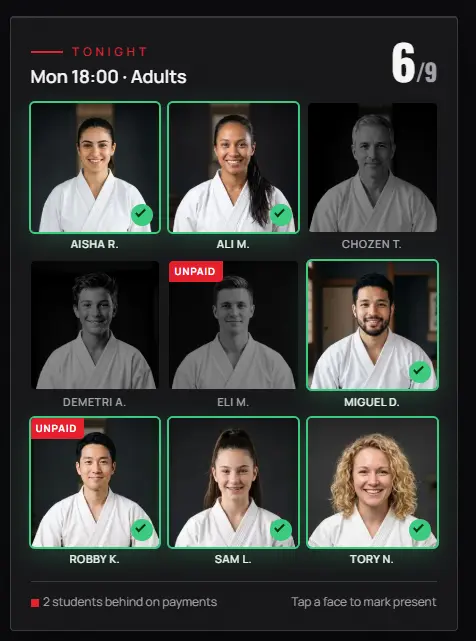
Dojoto sits at the narrow end. The sensei opens today’s training on their phone and taps the faces of who came; students and parents install nothing, and each week’s trainings appear by themselves from the group’s schedule. It does attendance and monthly fees and nothing else, for €5 a month for the whole club after three free months. Any app needs an internet connection. A tap usually gets through on poor reception, and if one fails the face is outlined in red so you tap again. In a basement hall with no signal at all, paper is the better tool.
How do you record a student from another group?
Mark them on the register of the training they attended and leave their home group unchanged. That way the session’s count is right and the training still adds to the student’s own total. Take their name from the master list rather than writing it fresh, or the club ends up with two records for one person.
It happens more often than the software guides suggest: a teenager whose timetable changed comes to the Wednesday adults’ class, or two groups train together before a grading. Each method handles the visitor a little differently.
| Method | Where the visitor goes | What to watch |
|---|---|---|
| Paper register | Name written by hand under the group’s list, home group in brackets | Copy the training to their own group’s sheet later, or their total comes up short |
| Spreadsheet | A row in that month’s tab, with the name picked from the Students tab | Typing the name fresh creates a second “student” |
| Full management system | Depends on the product; some show only the class’s own members at check-in, so a visitor is searched for | Test it with a visitor during the trial or demo before you commit |
| Dojoto | Each training lists its own group first, then the rest of the club a tap away | The student keeps their home group |
Martial arts attendance tracking with more than one sensei
Clubs with two or three instructors run into a different problem: two people marking the same group, or each keeping a private copy that never quite matches the other.
The sensei who teaches marks. Agree that whoever teaches a training marks it. If two senseis teach together, decide beforehand which one holds the register, because in a shared spreadsheet two people can tick the same session from two phones and one correction can overwrite the other.
Hand over in writing the same evening. When a sensei covers someone else’s group, the open questions (a visitor not yet on the master list, a child who left early hurt) go into a note or a message that night. For a fuller routine that also covers cash taken on the mat, see how several senseis can share attendance and fee records.
Decide who can see the register. A children’s register shows which evenings a child is in a known hall. The GDPR says children merit specific protection with regard to their personal data, and child-protection guidance for sports clubs asks that such records be stored securely and shared only with those who need them: the club’s senseis, not a sheet pinned by the door or a link in the parents’ chat. In Dojoto each sensei signs in on their own phone and sees the groups they teach, the club owner sees everything, and a tap updates the other senseis’ screens on its own. It doesn’t keep a history of who changed a mark, so the rule about the teaching sensei still applies.
Whichever tool you pick, a register you can trust comes from two habits kept at every training: one list, and a register ready at the door before the first student arrives. Download the free attendance sheet to start on paper or in a spreadsheet, or see the Dojoto attendance workflow if you’d rather tap faces on your phone.
FAQ
What is the easiest way to take attendance in a martial arts class?
For most small clubs, the easiest way is for the sensei to mark each student as they come through the door, on a register that already holds every student’s name. It uses the waiting time before training, so the group starts on time. Students who arrive later are added when they step on the mat.
How do I count classes before a grading?
Count the marks per student from the date of their last grading, not from the start of the season. On paper that means typing the monthly sheets into a computer first, or adding up ticks by hand; a spreadsheet or an exported register totals them with one formula. Set your club’s minimum in advance and apply it to every student the same way.
Can I track attendance on paper instead of an app?
Yes. A paper register works well for a small group if it uses names from the master list and the month’s sheet is prepared before the first training. Its limits are sharing between senseis and typing the ticks into a computer before you can count them, and both take longer as the club grows.
Should students sign themselves in at a martial arts class?
Self sign-in suits larger gyms with a front desk, a tablet and adult members. In a small club, especially one with children’s groups, the sensei marking at the door is usually faster and more complete, because sign-in books and kiosks depend on students remembering and on someone checking that they did.
Want it for your dojo?
Join the waiting list. Your first 3 months are free.